

Roadmaps & Release Notes
November 11, 2026
Ally 2.21 Release to production: November 11, 2026
# Ally
November 11, 2026

Ally 2.21 Release to production: November 11, 2026
The 2.21 release continues our focus on improving the student experience by making it easier for students to read course content their way. We are excited to introduce Enhanced Reader, a new alternative format that lets students customize the reading experience for course content in ways that work best for them. We’ve also moved Allys AI Alt Text Assistant to an upgraded model to keep bringing the latest model benefits to instructors crafting impactful alternative text. Rounding it out are fixes for Blackboard, Canvas, Moodle, and D2L Brightspace integrations.
Enhanced Reader, the new Alternative Format from Ally
Instead of simply adapting to how a file was formatted, students can now adjust the text, colors, and reading aids to fit how they focus, process, and read best. Students can also take their readings offline with them (with settings intact) for greater flexibility on the go regardless of internet connection. The result is course content that meets students wherever they are and whenever they are ready.
Image 1: Enhanced Reader example with reading ruler
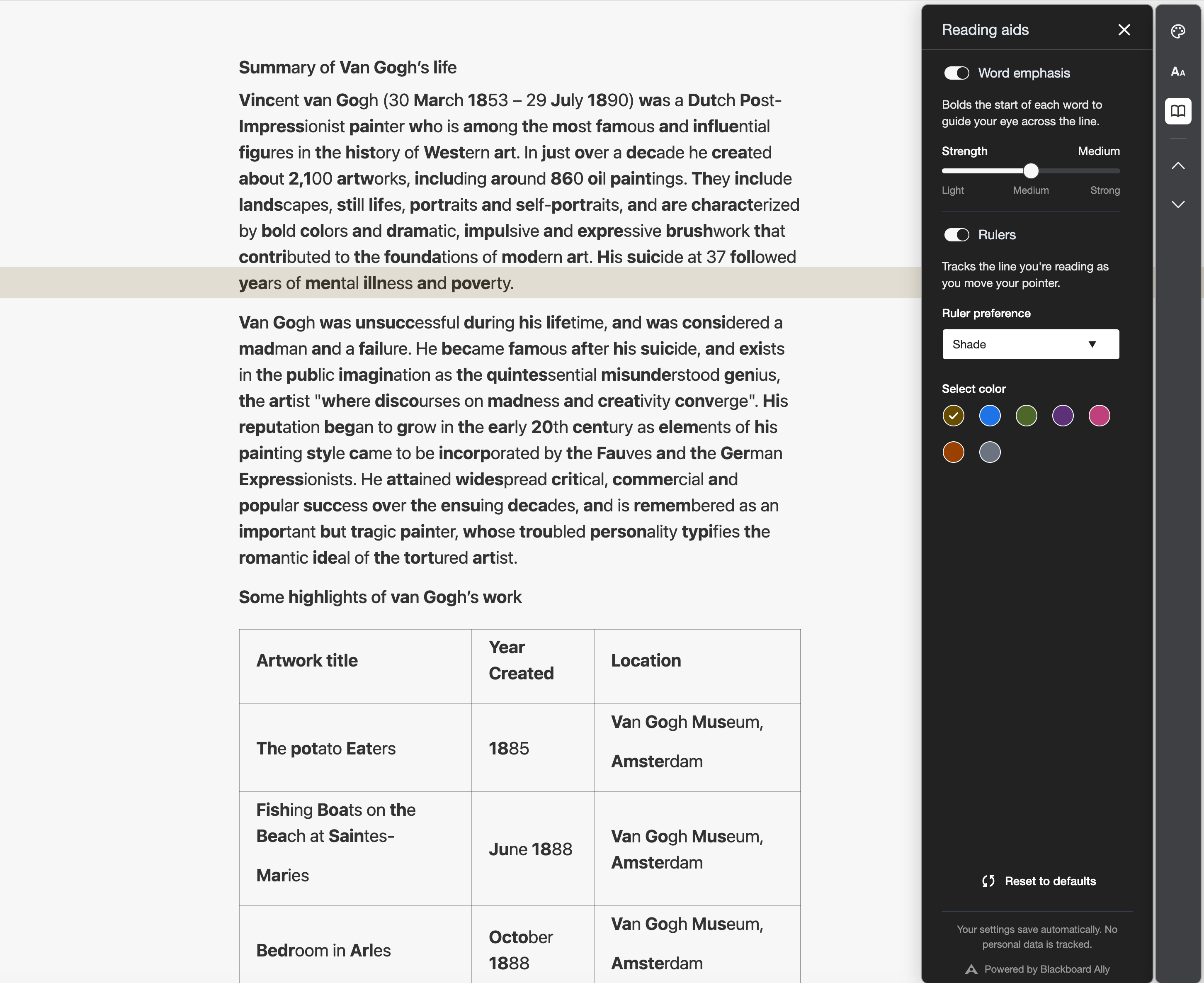
Enhanced Reader example with reading ruler
Enhanced Reader offers a variety of new settings organized into three panels, allowing students to build a view that works with their own unique preferences.
Appearance
- Theme: Switches between light and dark modes, reducing glare and eye strain during late-night study sessions or long reading stretches.
- Background Colors: Lets students choose from Gray, Blue, Amber, and Stone color themes to find the contrast that’s most comfortable for them.
Text
- Font type: Lets students choose a typeface that’s easier for them to read, including Atkinson Hyperlegible (designed for readers with low vision) and OpenDyslexic (designed for readers with dyslexia).
- Font size, line height, and letter spacing: Lets students enlarge text and add space between lines and letters, making dense readings less crowded and easier to follow.
Reading aids
- Word emphasis: Bolds the start of each word to guide the eye across the line. Students can set the strength to Light, Medium, or Strong or turn it off entirely.
- Rulers: Tracks the line a student is reading, helping them keep their place and filter out surrounding text. Students can choose from Underline, Shade, Lightbox, or Sheet styles and pick a ruler color.
Note: Enhanced Reader saves each student’s preferences automatically in their browser, so their settings are ready the next time they open a file. These preferences stay on the student's device, and no personal information is sent to Ally.
Image 2: Ally alternative formats download window with Enhanced Reader visible
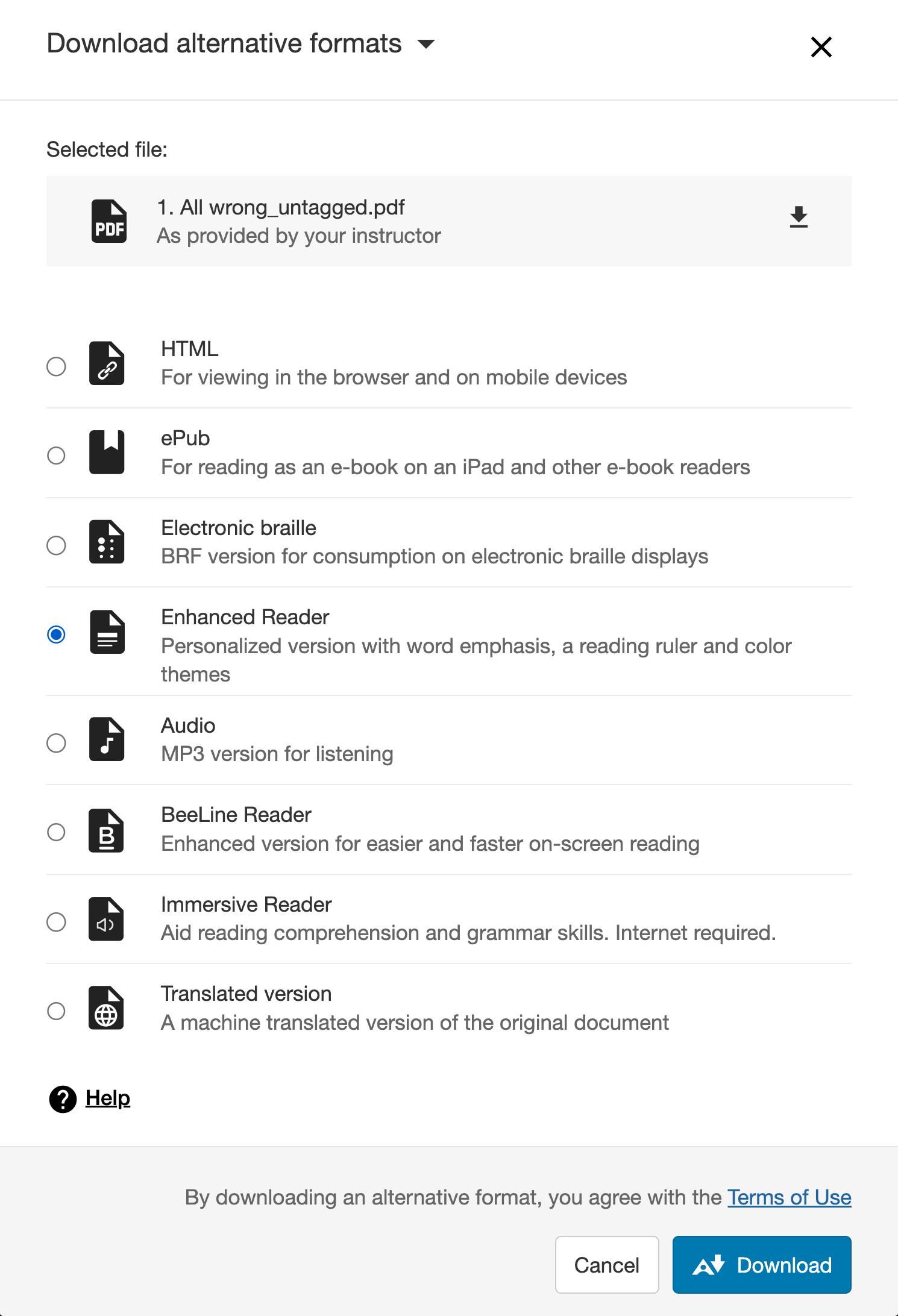
Ally alternative formats download window with Enhanced Reader visible
Select the Alternative formats button next to a course file. Then select Enhanced Reader, Download. The file opens in the browser, and students can change their settings at any time while reading. Each panel includes a Reset to defaults option.
Note: Enhanced Reader is available to all institutions for Blackboard, Canvas, Brightspace and Moodle integrations automatically, with no setup required. It appears alongside the existing alternative formats, so administrators don’t need to change any configuration settings.
New PDF Administrator Configuration Settings for Title, OCR and Language Quick Fixes
New feature flags have been added for administrators to control the availability of the PDF Quick Fixes for Missing Title, Missing Language and Scanned PDFs. These features are set to On by default, and administrators can turn them off as needed.
Image 3: PDF Remediation Configuration options
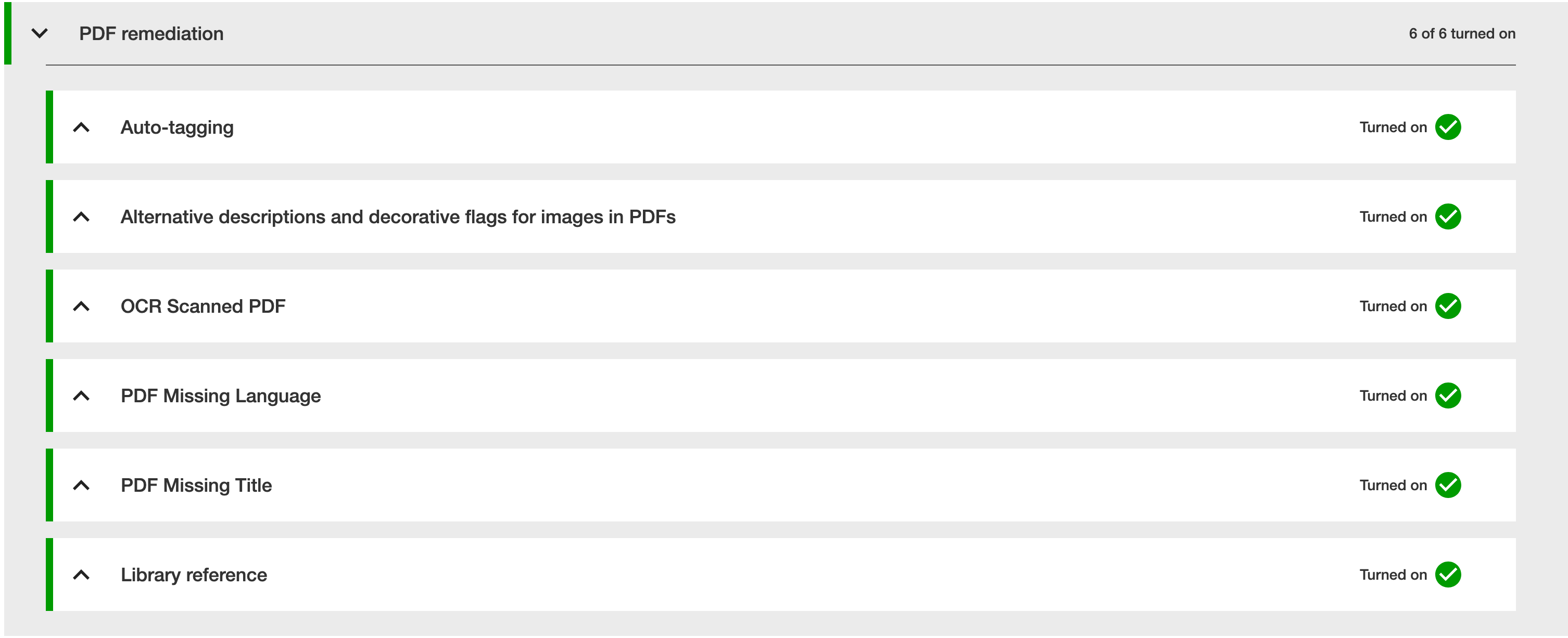
PDF Remediation Configuration options
Upgraded AI Alt Text Assistant
The AI Alt Text Assistant has been updated to take advantage of several additional improvements in the underlying AWS Bedrock AI models, including improved handling to avoid hallucinations when analyzing specific images. No action is required by Administrators. Refer to the AI Alt Text Assistant Transparency Note for more details.
Bug Fixes and Improvements
- Fixed an issue in Blackboard integrations that sometimes caused the score indicator for files added in a content block within Documents to disappear when screen size was reduced.
- Fixed an issue in Canvas integrations that sometimes caused the file preview to fail after applying the PDF Title Quick fix which also prevented the new file from being uploaded back to Canvas.
- Fixed an issue in the Instructor Feedback that caused instructors to get a “This PDF is less accessible” error if they fixed a title after auto-tagging a PDF.
- Improved how screen readers announce the score for each line item in the issues list of the Course Accessibility Report.
- Fixed an issue in older Moodle versions that caused an inconsistency with how score indicators were placed on images inserted inside of tables.
- Fixed an issue with Canvas Files Area that caused the entire page to reload after making a fix in Ally.
- Fixed an accessibility issue in Canvas that caused keyboard focus to be lost when attempting to reopen a fixed file.
- Improved the focus indicators within the AllyInstructor Feedback preview toolbar.
- Fixed a bug in older Moodle versions that sometimes prevented the interface from refreshing after removing a seizure inducing GIF.
- Fixed an issue within the Ally Instructor Feedback that sometimes prevented the highest priority issue from being displayed when initially opening the feedback panel for a PDF.
- Fixed an issue that caused the download of the Usage Report to timeout and fail for administrators while attempting to pull longer date ranges.
As a reminder, Release Notes are available on our help site: https://help.anthology.com/ally-lms/en/administrators/whats-new/2026-release-notes.html
Comments (0)
Popular

Dive in
Related
Blog
Inside Ally Office Hours (October 12th, 2026)
By Katie Grennell, PhD. • Oct 14th, 2026 • Views 33
Blog
Inside Ally Office Hours (October 12th, 2026)
By Katie Grennell, PhD. • Oct 14th, 2026 • Views 33