

Roadmaps & Release Notes
October 13, 2026
Ally 2.20 Release Notes
# Accessibility
# Ally
October 12th, 2026

Chris Aldin
Ally 2.20 Release to Production: October 12th, 2026
PDF Image Alt Text Quick Fixes
As part of our continued focus towards bringing more PDF remediation options to instructors, the ability to add alternative text directly to images in PDFs is now available to help further streamline faculty workflows.
Note: this feature update is available in Blackboard LMS, Canvas, D2L Brightspace, and Moodle LMS integrations.
Instructors
Turned on by default with this release, instructors now have the option to manually add alternative text to images in PDFs within the Ally Instructor Feedback workflow. After adding alternative text, Ally will automatically upload a new version directly to the course while overwriting the old file.
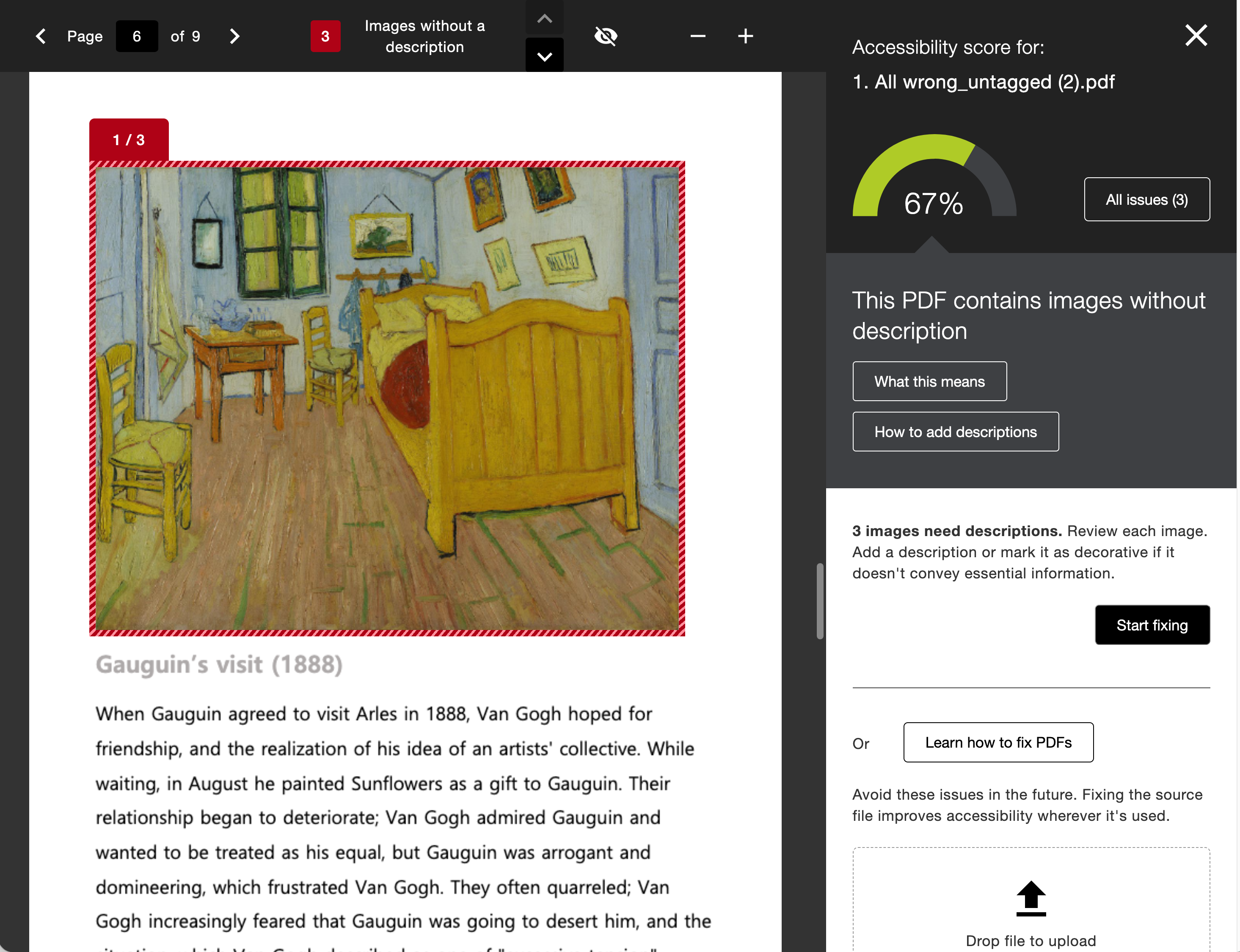
We've also added Ally's AI Alt Text Assistant to this workflow as an option to further empower instructors that are looking for more starting points. If your administrator has turned on the AI Alt Text Assistant option, instructors can also generate suggested alternative descriptions for images embedded in the PDF.
Just like images embedded in WYSIWYG content, the AI Alt Text Assistant also considers the context of the surrounding content in the PDF as part of the initial prompt to power even more detailed descriptions.
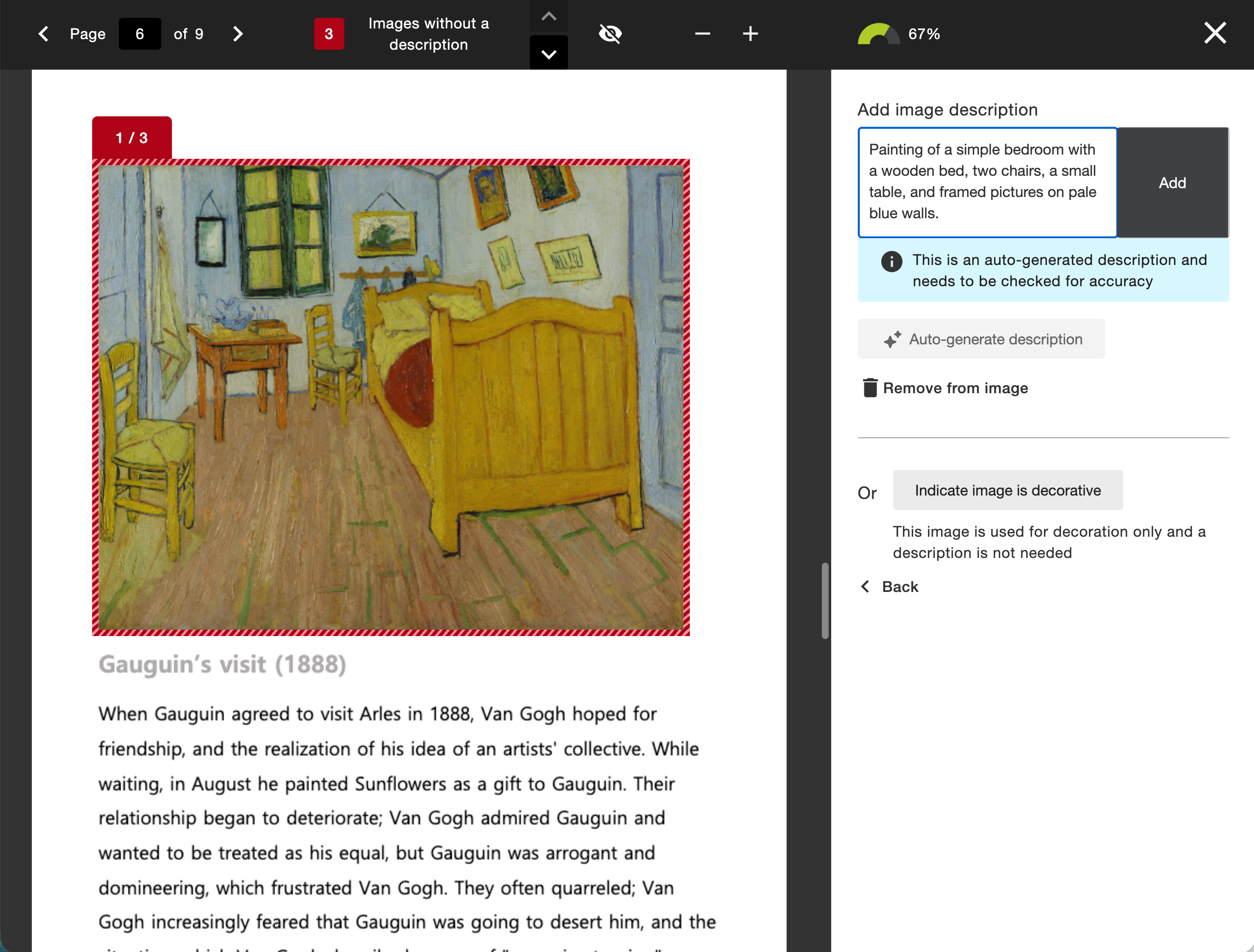
Note: The AI Alt Text Assistant must be turned on by the administrator to use the suggestion feature in this workflow. This feature is off by default. As a reminder, alternative descriptions are not applied automatically. Each suggestion requires the instructor's review and approval.
Administrators
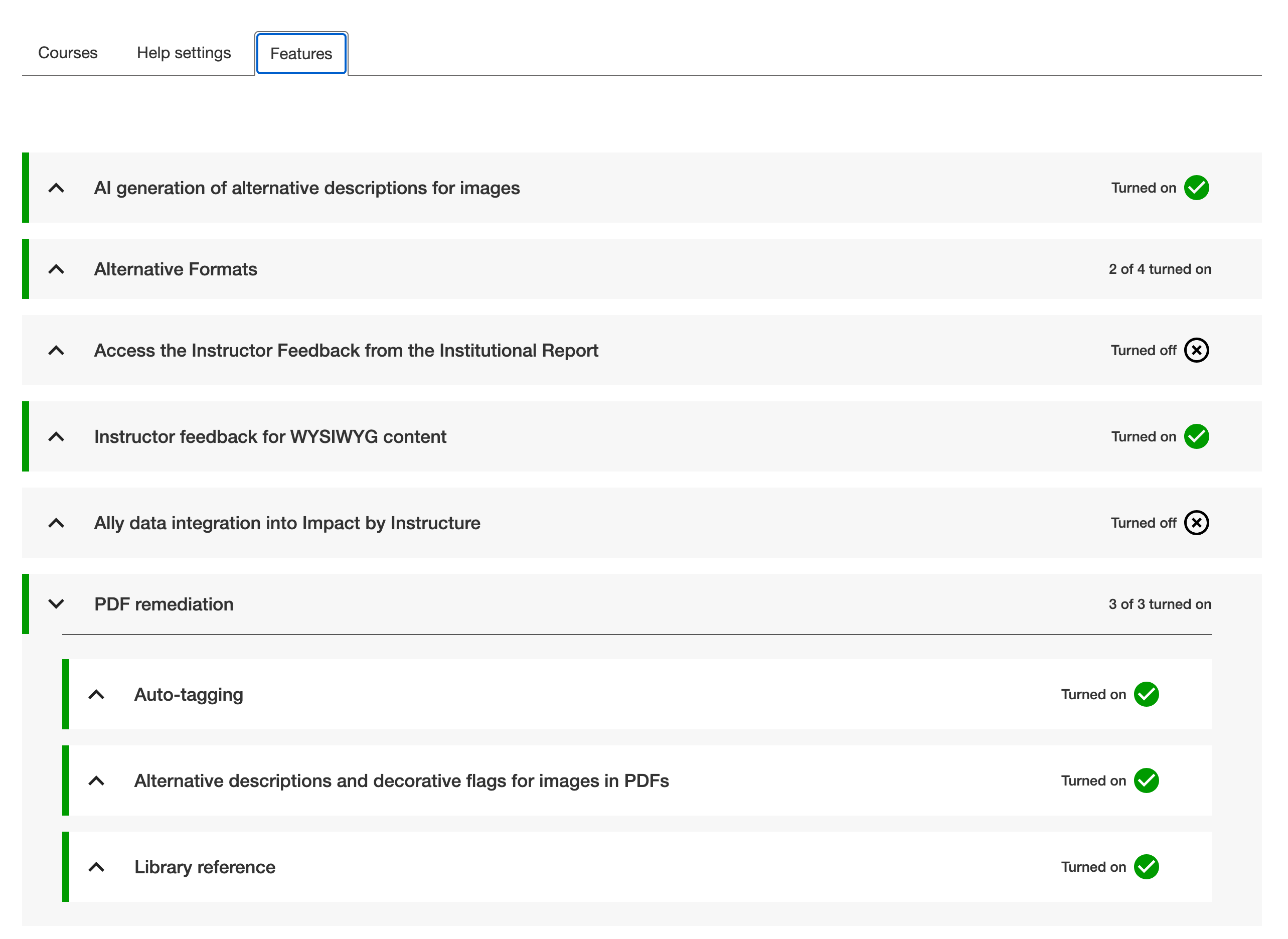
Ally administrators can control each component of this feature at any time from the Ally Configuration settings. This feature takes advantage of two feature flag configuration options in the Ally Configuration tool.
Administrators have the option to turn off the entire alternative text workflow for instructors. When PDF Alt Text is turned on, you can also decide to only provide standard manual alternative text or add the AI powered suggestions of the AI Alt Text Assistant.
The AI Alt Text Assistant feature flag acts as a global setting across content types, so if you already have this turned on for WYSIWYG content, you do not have to take any additional action.
AI Transparency Note, Terms of Use, and Principles
We recommend reviewing the documents linked below (including the updated Transparency Note) as you consider using Ally’s AI Alt Text Assistant in PDF content or rich content. Refer to AI Alt Text Assistant for more information.
Refreshed Configuration Tool Options
The Configuration Tool Features tab has been reorganized by feature type to allow for easy locating and setting based on institutional preferences.
Administrators still have full control over what features are available to instructors when using a more streamlined and organized interface.
Blackboard LMS New Content Editor (Early Access) Improvements
As part of this release, we’ve also included quite a few improvements to the Ally integration within the New Content Editor for Blackboard LMS Documents, including:
- Improved how Ally interacts with the Hierarchy within the content block (including Title, Header, Sub header, Paragraph)
- Improved how Ally handles images with alternative text and/or those set as decorative within the content block
- Fixed an issue that was incorrectly impacting the size of a individual image within a content block
- Fixed an issue that prevented consistently identifying broken links in a content block
- Fixed an issue that caused broken links removed via the Ally Instructor Feedback Quick Fix to not be accurately reflected in the resulting content in the content block
- Fixed an issue in the Instructor Feedback that caused the Quick Fix field to display the previously fixed broken link instead of the current highlighted broken link
- Fixed an issue in the Instructor Feedback that sometimes resulted in the “Apply Fix” process getting stuck when fixing a broken link
- Fixed an issue in the Instructor Feedback that sometimes caused a previously removed broken link to reappear if it was removed directly in the content editor itself
- Improved how text with contrast issues is highlighted and fixed within the Instructor Feedback
- Fixed an issue in the Instructor Feedback that caused all content to be set as a header when fixing/changing the heading style for an item in the Quick Fix
- Fixed an issue that caused some images without description to not be recognized or listed in the Course Accessibility Report.
- Fixed an issue that caused Ally indicators to be visible while in edit mode
- Fixed an issue that prevented contrast and broken link issues from being highlighted correctly when found inside a table
- Fixed an issue that caused certain images to disappear after fixing an image specific issue from within the Course Accessibility Report
- Fixed an issue that prevented the last table in a document from being fixed from within the Course Accessibility Report when multiple tables are present
- Fixed an issue that caused parts of the highlighted text in the Instructor Feedback to be hidden instead of remaining visible
Note: Please note the above improvements are specific to the Content Editor in Blackboard LMS only.
Additional Bug Fixes and Improvements
- Fixed an accessibility issue that caused contrast issues on the focus indicator within the Instructor Feedback
- Fixed an accessibility issue within the PDF Auto Tagging workflow that prevented the focus indicator from moving to the Learn More button as expected
- Fixed an accessibility issue when navigating the Institutional Report with a keyboard that caused the tooltip under the Total Courses pie chart to disappear unexpectedly.
- Implemented an accessibility improvement in the Instructor Course report to ensure that each Start button is easily distinguishable when using a screen reader
- Fixed an accessibility issue in the Instructor Feedback to ensure the zoom in/ zoom out actions are announced to a screen reader when activated
- Fixed an accessibility issue in the Instructor Feedback to ensure the view/hide toggle actions are announced to a screen reader when unselected
- Fixed an accessibility issue in the Instructor Feedback PDF title Quick Fix to ensure clearing the input when using the clear button is announced to a screen reader
- Fixed an accessibility issue in the Instructor Course Report content list to ensure a proper focus indicator is applied while navigating with a keyboard
- Fixed an accessibility issue in the Instructor Course Report to ensure the overall content count is announced to a screen reader
- Fixed an issue for D2L Brightspace integrations that caused some departments to disappear from the Directory tab within the Institutional Report when using custom org units
- Fixed an issue for Canvas and D2L Brightspace integrations that resulted in missing token integration errors because of an invalid cookie being cached and subsequently rejected by the LMS and requiring reauthorization
- Fixed an issue in Moodle that sometimes caused the Alternative Formats download window to display the wrong text for the filename when files were embedded in rich content
Comments (0)
Popular

Dive in